
Thought I would share this very useful resource for anyone up here in Canada.
Jeffrey McMurtry of Jeff’s Maps is one of those people I hope is nominated for an Order of Canada really soon for all of his fine work.
He’s singlehandedly created the best map of Algonquin Park. He taught himself Adobe Illustrator, and 140 layers, 17 million points and 250MB later, he had something both beautiful and useful. Oh, and if that wasn’t enough, he then went on to do a map of Temagami and a map of Killarney. Oh, and you can download them for free. You can also buy a waterproof printed version.
His Facebook page is worth following as it’s always a goldmine of information.
And as if all this wasn’t enough, he’s gone and done something equally useful.
Sadly, the Canadian government has washed their hands of the business of maintaining the topographic maps they once published. They did however put them up on line, as one final hurrah. Searching for the ones you needed wasn’t so easy though. If you had a key that told you what code to look for, you could find it.
What Jeff has done is made a map that allows you to scroll across the whole country and find exactly the area you need. Much easier. You can view areas in either 1:50,000 or 1:250,000 scale. Once you find what you need, you can zoom in, and choose the map you want. You can then choose to download a PDF or TIFF version or purchase a paper or tyvek map.
While nothing would make me happier than seeing the sort of attention to detail that countries like the Netherlands devotes to its maps applied here in Canada, I’m happy this resource exists.
Maybe Mr. McMurtry can be convinced to get working on updated topos of the whole country.
Jeff’s Topos
Showing posts with label maps. Show all posts
Showing posts with label maps. Show all posts
Thursday, 5 March 2015


Saturday, 29 March 2014
3D Terrain Maps for 3D Printing
At the Dundas Valley Trail Centre is a very large and very impressive diorama of the whole valley. I covet it. Way too big for my space, but if I buy that huge mansion one day, I might make something similar.
I know I’m nerd, but I’ve thought that it would be neat to have a 3 dimensional representation of favoured areas. A mountain you’ve climbed, a trail you’ve hiked, a park you’ve canoed, even just an area you’ve lived in, etc. A sculpture to remind of good times. Or, a SAR team might benefit from a model they could use to brief their team members with. Use topo maps enough and you learn to be able to visualize the terrain, but there is something to be said for a physical, visual representation.
Well, the Geospatial Information Authority of Japan, their national mapping and surveying authority, offers a free web-based three-dimensional topographical map of Japan that can be used for 3D printing.
http://www.3ders.org/articles/20140322-japan-now-offers-free-3d-terrain-maps-for-3d-printing.html
Uhm....yummy. Given that Canada has largely given up on updating their topographical maps, it might be a bit much to assume that our government will offer anything similar soon, but one can hope.

I know I’m nerd, but I’ve thought that it would be neat to have a 3 dimensional representation of favoured areas. A mountain you’ve climbed, a trail you’ve hiked, a park you’ve canoed, even just an area you’ve lived in, etc. A sculpture to remind of good times. Or, a SAR team might benefit from a model they could use to brief their team members with. Use topo maps enough and you learn to be able to visualize the terrain, but there is something to be said for a physical, visual representation.
Well, the Geospatial Information Authority of Japan, their national mapping and surveying authority, offers a free web-based three-dimensional topographical map of Japan that can be used for 3D printing.
http://www.3ders.org/articles/20140322-japan-now-offers-free-3d-terrain-maps-for-3d-printing.html
Uhm....yummy. Given that Canada has largely given up on updating their topographical maps, it might be a bit much to assume that our government will offer anything similar soon, but one can hope.
Monday, 16 December 2013
Maps That Will Change How You Look At The World
I always find maps and infographics fascinating, and these are particularly interesting.
What Antarctica would look like without ice. You’ll be stunned to see what the most common highest paid public employee in America is. You’ll laugh at literal Chinese translations for European country names. Graphs showing the world’s population by latitude and longitude. Countries sized by how much oil they have. Selected U.S. cities renamed for countries with similar GDPs. Where there are internet “black holes”. Air traffic over 24 hours.
Some of these maps are works of art (rivers of America, earthquake frequency, airline routes all over the world {shown below})
 What directions the rivers of the world flow in.
 Lightning strikes
 Airline routes all over the world.
http://slightlywarped.com/crapfactory/curiosities/2013/august/maps_that_will_change.htm
http://slightlywarped.com/crapfactory/curiosities/2013/october/more_maps.htm
(The second one has a few repeats, but the new one make it worth it.)
What Antarctica would look like without ice. You’ll be stunned to see what the most common highest paid public employee in America is. You’ll laugh at literal Chinese translations for European country names. Graphs showing the world’s population by latitude and longitude. Countries sized by how much oil they have. Selected U.S. cities renamed for countries with similar GDPs. Where there are internet “black holes”. Air traffic over 24 hours.
Some of these maps are works of art (rivers of America, earthquake frequency, airline routes all over the world {shown below})


http://slightlywarped.com/crapfactory/curiosities/2013/august/maps_that_will_change.htm
http://slightlywarped.com/crapfactory/curiosities/2013/october/more_maps.htm
(The second one has a few repeats, but the new one make it worth it.)
Thursday, 21 February 2013
Cool Map Tools
Found this recently and thought there were some nifty tools featured there. (From what I can deduce, this is merely a compendium of tools. They aren’t necessarily the creators of them. I think more than one entities efforts are included. Because of that some of them appear to overlap in abilities.) Scrolling down each one a ways reveals some more info, known problems, end users advice, etc.
Radius Around Point - ie, what area falls within say a 50 mile radius of a particular location. Size of radius can be set to any desired distance.
How Far Can I Travel - how far can you travel within a certain time period given a specified mode of transportation and speed travelled.
How Far Is It Between - gives both an “as the crow flies” and roadway distance between two named points on a map.
Trip Calculator - Similar to the above tool, but allows you to determine the route as opposed to an algorithm determinining the most direct route. Want to meander along on back country roads and take a more circuitous route? This will allow you to figure out the distance and time involved.
Measure Distance - (Perhaps somewhat similar to the above.) You can do a very precise measurement of the distance of a route you want to or have traveled. And you aren’t limited to an “as the crow flies” route either. You can click and leave a way point as many times as you like to more accurately follow the route you will or have taken.
KML File Creator - Keyhole Markup Language. uhm....not entirely sure what this does.
Area Calculator - A planimeter tool that can measure the enclosed area of a defined polyline on a map. Will also give you the perimeter length as well as the area in a few different formats.
Map Tunneling Tool - A bit silly, but allows you to determine where exactly you would end up on the other side of the Earth - if you were to dig a tunnel straight through from where you are.
Tunnel to the Other Side of the Google Earth - Similar to the above tool.
How Far Does Santa Have To Travel - Again, another bit of silliness.
International Meeting Centre of Gravity Tool - Have a bunch of delegates from many different locations coming together for a conference, meeting, etc.? This tool will allow you to determine the most central location to meet.
Range Finder - Find out the end point on a map when you specify a start point, a bearing and a distance.
Elevation Finder - Used to find an estimate for the elevation of a point on the earth. Although it didn’t display any info for me. Maybe just the particular browser I used?
Find Sunrise and Sunset Time at a Location - Find out the next sunrise and sunset of any point on the earth.
There are also some post code and zip code related tools.
http://www.freemaptools.com/map-tools.htm
Radius Around Point - ie, what area falls within say a 50 mile radius of a particular location. Size of radius can be set to any desired distance.
How Far Can I Travel - how far can you travel within a certain time period given a specified mode of transportation and speed travelled.
How Far Is It Between - gives both an “as the crow flies” and roadway distance between two named points on a map.
Trip Calculator - Similar to the above tool, but allows you to determine the route as opposed to an algorithm determinining the most direct route. Want to meander along on back country roads and take a more circuitous route? This will allow you to figure out the distance and time involved.
Measure Distance - (Perhaps somewhat similar to the above.) You can do a very precise measurement of the distance of a route you want to or have traveled. And you aren’t limited to an “as the crow flies” route either. You can click and leave a way point as many times as you like to more accurately follow the route you will or have taken.
KML File Creator - Keyhole Markup Language. uhm....not entirely sure what this does.
Area Calculator - A planimeter tool that can measure the enclosed area of a defined polyline on a map. Will also give you the perimeter length as well as the area in a few different formats.
Map Tunneling Tool - A bit silly, but allows you to determine where exactly you would end up on the other side of the Earth - if you were to dig a tunnel straight through from where you are.
Tunnel to the Other Side of the Google Earth - Similar to the above tool.
How Far Does Santa Have To Travel - Again, another bit of silliness.
International Meeting Centre of Gravity Tool - Have a bunch of delegates from many different locations coming together for a conference, meeting, etc.? This tool will allow you to determine the most central location to meet.
Range Finder - Find out the end point on a map when you specify a start point, a bearing and a distance.
Elevation Finder - Used to find an estimate for the elevation of a point on the earth. Although it didn’t display any info for me. Maybe just the particular browser I used?
Find Sunrise and Sunset Time at a Location - Find out the next sunrise and sunset of any point on the earth.
There are also some post code and zip code related tools.
http://www.freemaptools.com/map-tools.htm
Thursday, 13 December 2012
Maps on Spark
CBC Radio 1’s Spark is always a great show. While it falls under the “technology” heading it doesn’t so much deal with what the latest games that are coming out, or how many gigahertz of terabytes a new gizmo has. It deals more specifically with the interplay of society and technology and how culture is shaped by that. This weeks episode, episode 199, dealt with maps. If, like me, you find maps interesting, and especially if you dig DIY, this is a good one.
I have been puttering away at a map of my area, but far too many other things vying for my time and effort.
My idea is to take info from a few different sources and compile it into one So much more detail is revealed on aerial photos. Some maps show hiking trails, while others show pubic transit info. Some show topographic or geological info. Some show more human details, building and the like. Take info from a bunch of sources and put it into one. I dream of one map that I can not only create in layers, but view in layers. Having it so that the viewer can customize it to what they want. Someone might have no need to view detail that a contractor might want to view - where hydro poles and storm drains are, but another person might want to not clutter up a map with where public transit routes are, and another could care less about the geology underlying an area or about the topography or lats and longs.
The city I live in has lots of maps available, showing a host of info, some nicely detailed. Problem is that they are all locked PDFs. I know how to work around that and hack into them, but it creates its own set of problems. There are no more layers, typed is cracked up. A lot of time to get that back to a version I think is acceptable. In its own way it solves some problems and saves some time, but it also forces a lot of effort into fixing it. Is it worth it to devote time to it? - one of those 50-50 things. That’s why the efforts of the city frustrate me. Let me and everyone else at them. I realize they’ve spent an untold amount of money to have a map drawn, but I don’t want to access their maps for nefarious ends. I just want to add that other bicycle route I know of, or add where that grove of oaks is, or add that path that an aerial photo didn’t reveal, or add info that an aerial photo did reveal. If I can add that to a public database, or even just use for my self - print out one or two copies, that's it. Once I get the boat in the water, I might want to add info that other boaters might dig. The spot where you can lift over into another area, precise location via GPS of where there is a fallen tree that is creating an obstruction, those kinds of things. If I go to the trouble to annotate maps, or make improvements to them, why go to the trouble just for me. Share that info.
http://www.cbc.ca/spark/episodes/2012/12/07/199-scouts-apps-maps/
And some of the other 198 episodes are worth checking out as well. Great show.
I have been puttering away at a map of my area, but far too many other things vying for my time and effort.
My idea is to take info from a few different sources and compile it into one So much more detail is revealed on aerial photos. Some maps show hiking trails, while others show pubic transit info. Some show topographic or geological info. Some show more human details, building and the like. Take info from a bunch of sources and put it into one. I dream of one map that I can not only create in layers, but view in layers. Having it so that the viewer can customize it to what they want. Someone might have no need to view detail that a contractor might want to view - where hydro poles and storm drains are, but another person might want to not clutter up a map with where public transit routes are, and another could care less about the geology underlying an area or about the topography or lats and longs.
The city I live in has lots of maps available, showing a host of info, some nicely detailed. Problem is that they are all locked PDFs. I know how to work around that and hack into them, but it creates its own set of problems. There are no more layers, typed is cracked up. A lot of time to get that back to a version I think is acceptable. In its own way it solves some problems and saves some time, but it also forces a lot of effort into fixing it. Is it worth it to devote time to it? - one of those 50-50 things. That’s why the efforts of the city frustrate me. Let me and everyone else at them. I realize they’ve spent an untold amount of money to have a map drawn, but I don’t want to access their maps for nefarious ends. I just want to add that other bicycle route I know of, or add where that grove of oaks is, or add that path that an aerial photo didn’t reveal, or add info that an aerial photo did reveal. If I can add that to a public database, or even just use for my self - print out one or two copies, that's it. Once I get the boat in the water, I might want to add info that other boaters might dig. The spot where you can lift over into another area, precise location via GPS of where there is a fallen tree that is creating an obstruction, those kinds of things. If I go to the trouble to annotate maps, or make improvements to them, why go to the trouble just for me. Share that info.
http://www.cbc.ca/spark/episodes/2012/12/07/199-scouts-apps-maps/
And some of the other 198 episodes are worth checking out as well. Great show.
Tuesday, 24 July 2012
Go buy a map?
Any one that knows me will probably point out that I am ridiculously prepared. But if I am just popping over to the groceteria for a few things, the chance that I will be all that prepared is far less likely. I’m not bringing all my maps of the area with me if I’m strolling to the park with my nephew to kick a ball around for an hour. If you ask me where a street is and it’s a block or two away, I can direct you. Ask me about a street on the other side of town, a part of town I’m just not familiar with, you’re out of luck. I always help people when I can, but I can’t possibly recall every name of every street and the precise turn by turn directions of how to get there in a city the size of the one I live in.
I
had a guy stop me the other day and ask me where Whitefish Crescent
was. No idea. A crescent is a suburb thing. There are no suburban areas
anywhere near here. “I really don’t think it’s in a 5 km, 10 km radius of here. I
don’t know...go buy a map maybe?”
Went
home and looked it up. It was more than 20 km away, so far out, it was
practically in a whole other city. So dude had no idea where he was, no
idea where he needed to be was, no idea how to get from here to there.
I worked in Mississauga for a few years, in a sprawling warren of an industrial complex. I got to where I needed to be, walked to a place nearby to get lunch once in a while, went home at the end of the day. I didn’t become familiar with every street and road in the area. Returning from dropping some mail in the box a woman stops me and asks me where a particular street was.
“Sorry, no idea. Go to the variety store over there and buy a map maybe?”
I know, she probably thought Dennis Leary wrote a song about me. But really. If you need to get somewhere, and you don’t bother to figure it out ahead of time, expecting that a random stranger on the street can accurately direct you is wishful at best. A map can direct you perfectly.
A few years ago I wandered over to my barber for a haircut, when two women in a car asked me where a street was. Didn’t sound familiar, so I told them I couldn’t help them. “Go buy a map maybe?”
When I got home my curiosity made me look it up. It was a short street somewhere up on the Mountain, diagonally on the other side of the city. Never had cause to be there, totally unfamiliar with the area. So here these dips were, aimlessly driving around, not sure where they were, no idea how to get to where they were supposed to be, hoping that random strangers far from their intended location could direct them perfectly to it.
Maybe I’m strange, but if I am going to an area I don’t know, I research it ahead of time. There is this incredible invention called the internet. It provides you with maps, directions, now even photos of the exact place you have to be. Even when it didn’t exist there was a thing called a library, chock a block full of great info. Or I just ask of the place I am going to if they can give me some clues. If not, many places sell cheap gold mines of information called maps. If the place I am in currently doesn’t have those maps, I will get one the instant I hit the ground in an unfamiliar location.
This all seems amazingly logical to me. But I am probably strange.
Monday, 9 January 2012
Land Information Ontario - Make A Map
This made me feel all tingly. Make a map of whatever area you want in Ontario and add layers of whatever information is relevant to you.
And you can also draw in elements of your own.
If anyone has difficulty locating me any time in the next month, this will be why.
Exciting!
http://www.lio.ontario.ca/imf-ows/imf.jsp?site=makeamap_en
And you can also draw in elements of your own.
If anyone has difficulty locating me any time in the next month, this will be why.
Exciting!
http://www.lio.ontario.ca/imf-ows/imf.jsp?site=makeamap_en
Tuesday, 18 October 2011
MapRank
MapRank is a search tool from the David Rumsey Map Collection that allows you to find a historical map of a given area using Google Maps. No guarantee that any maps will exist for the area you choose to search, but a very cool tool.
Thursday, 29 October 2009
Map’mups
I’ve shown my earlier attempt at a map case. It worked okay, but going into it I knew it would be a stop gap measure to tide me over. I already had the plans for something considerably more elaborate worked out in my head. And this is it.

The design of this was driven primarily by canoeing, although being on foot or on bike was another scenario I envisioned it for. When in a canoe, on a large windswept lake and I need to do a map check, I want to be able to do that quickly and with little fuss. Same with things like getting an oft needed piece of equipment out – compass, GPS, binoculars, camera, radio. I’ve tried having things on a belt, but when seated, as in a canoe or kayak, it’s both uncomfortable and hard to access stuff. Up on the chest is a better spot for it.

There are similar items out there, HSGI’s admin panel being one, OSOE’s NSW admin panel being somewhat similar. My issue is that I use maps that I’ve printed out and laminated at a size of 8½" x 8½". Considerably bigger than what anyone is offering.

5 rows of PALS and 6 channels wide. About 10" x 10" all told. It’s big.

PALS on the back would have been overkill, and I couldn’t put any on the sides due to the zipper. What I could do, and what works very nicely is the Thomas’ Attachable Bag System, or TABS for short. It allows me to clip in side release buckles, siamese clips or anything else that works.

So far I’ve used the Kifaru shoulder straps that you can get for the Tailgunners or that come with the Scout. Works like it’s made for it. The two front male buckles jack into the two female buckles in the top corner tabs, and the two back male buckles jack into the bottom side female buckles.

At other times I’ve used the Kifaru shoulder strap, and carried it slung over one shoulder.
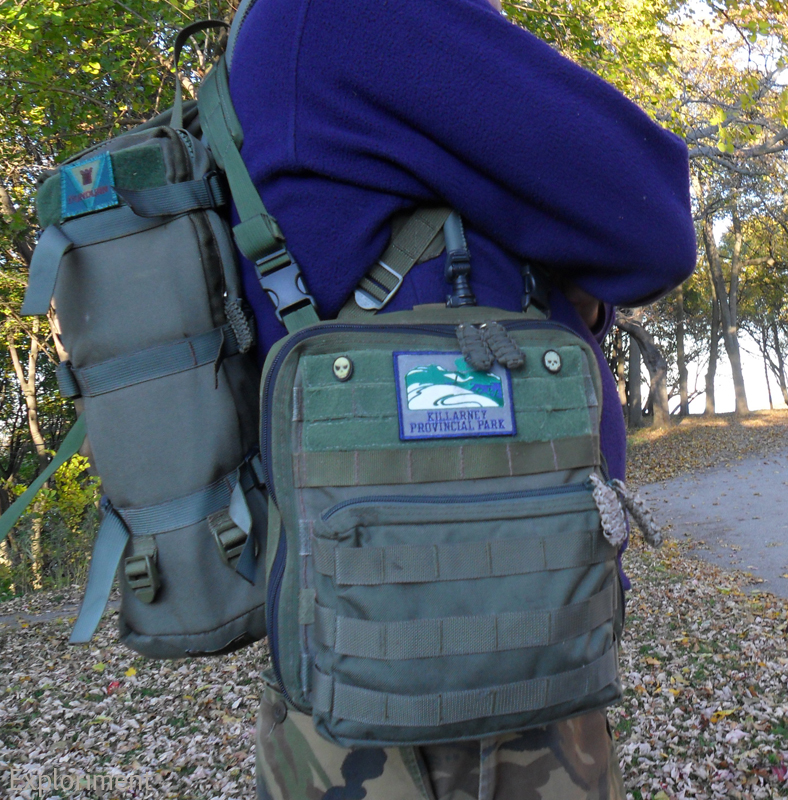
I can also clip it into buckles that I place on the shoulder straps of a pack.
I can also clip it into buckles that I place on the shoulder straps of a pack.


I can also mount the Map’mups on the face of a pack when I’m in transit.




With the Prune’mups, Saw’mups, Leatherman Wave and Camer’mups.


Bottom with drain hole. I put PALS webbing on here (as well as the corresponding part on the inside) not because I had any real purpose for it, but I figured what the hell. I may at some point find a pouch or something to stick there.


Along the back on the inside, behind the PALS webbing is a pocket that houses extra maps, note pads, guide books, etc. On top of that sit five 12½ cm (5") deep pockets - four that are about 8 cm (3") wide, and one that is 16 cm (6") wide. One of them has four slots for pens. These are for a note pads, a fresnel lens, map tools, protractors, a roller ruler, etc. Along the back are also four 550 cord loops, two on the top and two on the bottom, for tying dummy cords to.

Along the top at the back is also a Velcro strip for patches. Ones that are rotated out can be stored there.


Behind the map case is another slot pocket for storing extra maps. The map case itself can hold about a dozen maps, so the two extra slot pockets are great for the overflow.

The map case itself was something I wasn’t completely certain about. I used vinyl from a portfolio page. I don’t know how it may be different from the clear vinyl in other admin panels and the like. In the back of my head was the idea that it might not be as strong. For that reason I opted to make it removable. If for some reason there’s a problem with it, it will be easier to repair or replace that way. Another idea I had was to make a separate module for actually doing mapping. A thin board with bungee cord at the four corners to hold the paper down. Velcro on the back just like on the map case, so that it could then be popped in if the purpose is to go out and notate information. (shortly after I finished this I saw that CPGear had come out with their own take on this and saw that theirs featured a removable map window. Maybe my idea wasn’t such a compromise after all.)


The map case opens at the top with a zipper.

At the top corners are two tabs with grommets for the 550 cord to keep the front from flopping right down.


Oh and wait for it – drum roll please – the whole thing was done by hand.

The only things that I think are weak areas are the fact that with the weight of the pouches on the front, when opened it tends to sag a bit. Not majorly, but it does droop a bit. Also the zippers and the webbing they’re sewn to tend to puff out at the sides a bit. That’s not really a big deal though, just a bit of a cosmetic thing.
So now that I have this done, I’ve already got a whole new design floating around in my head. Taking some of the ideas from this, and then taking it in a whole other direction. Part of it is realizing that I could have done certain things an alternate way construction wise, and also just some very different ideas about how to approach the problem design wise. And that is all part of the fun. Designing it, making it, trialling it, and then making a good thing even better.
Sunday, 18 October 2009
Map Case
I was off on another canoe’m’ups and wanted to address a deficiency in my gear set up – the carrying of maps, and more importantly, being able to quickly get at them and put them back again.
I opted to use a slightly less heavy duty Cordura - 420 Denier – rather than the usual 1000 Denier I usually use. I knew it was going to be a rough prototypish thing, so it wasn’t that big of a concern.
It’s a simple envelope essentially, with PALS on the front to mount a few pouches on.
The great feature of it is the two straps on the upper corners. While I currently have snaps on there to mount to D rings on pack straps, I can easily replace them with D rings or side release buckles or siamese clips. The tri glides see to it that it’s relatively easy to swap them around according to the users needs, but they also make sure that whatever mounting option chosen, that they stay put.
Worked fairly well. The 8.5" x 8.5" laminated maps gave it a good form when they were inside. But if I took all of them out, the weight of the pouches would pull the front forward, making the re-insertion of the maps a bit awkward.
I opted to use a slightly less heavy duty Cordura - 420 Denier – rather than the usual 1000 Denier I usually use. I knew it was going to be a rough prototypish thing, so it wasn’t that big of a concern.
It’s a simple envelope essentially, with PALS on the front to mount a few pouches on.
The great feature of it is the two straps on the upper corners. While I currently have snaps on there to mount to D rings on pack straps, I can easily replace them with D rings or side release buckles or siamese clips. The tri glides see to it that it’s relatively easy to swap them around according to the users needs, but they also make sure that whatever mounting option chosen, that they stay put.
Worked fairly well. The 8.5" x 8.5" laminated maps gave it a good form when they were inside. But if I took all of them out, the weight of the pouches would pull the front forward, making the re-insertion of the maps a bit awkward.
I had another (far more elaborate) design in mind (that I’ve built in the interim) that overcame whatever shortcomings I felt this had, but this was still fun to make and addressed a short term need.

Front, devoid of any pouches.

Another view of the front. Leatherman WAVE is on there for a sense of scale.


View of the back.

Binoculars on the left, compass on the right.


Laminating maps like this is great beyond words. Two sided, handy size, can be turned in the direction you’re travelling, infinitely easier than sitting in a canoe on a wind swept, rainy lake trying to unfold and refold a map. Even if it is a Tyvek map, that just sucks.

Subscribe to:
Posts (Atom)


 Posts
Posts


